Contents - Index - Previous - Next
Navigation - Action Menus
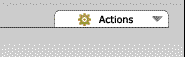
Though not strictly for navigation, another type of menu you will find are action menus. Action menus appear throughout the site, allowing users to perform activities. Action menus look like this:
These "Actions" menus will appear in any section of the Worshipteam.com website where the current user has access to perform activities. The kinds of activities that are accessible to any specific user is dependent on the context. If the current user is simply a team member, the "Actions" menu may contain one or two appropriate options, or perhaps no menu would appear at all. If the current user is a group or team administrator, the functions and options available on the menu would scale to their responsibility level appropriately.
Scrolling the mouse over an action menu will expand the menu, and the available options will drop down, making them available for selection. The example below is from an action menu found in the People section:
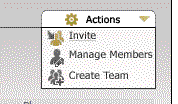
The user will note that the selectable actions will highlight a gold color as the user moves the mouse over them. Once the user mouse-clicks on the selection, the action will be initiated.