Contents - Index - Previous - Next
Group Wizard - Step 1
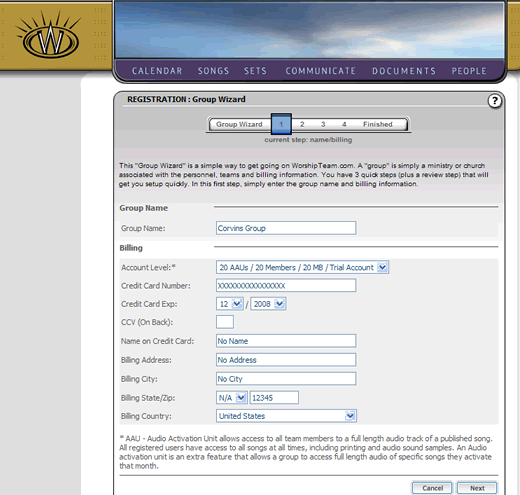
You have arrived at the first screen of the Group Wizard, as below:
Group Name/Billing
Fill in your desired Group Name. Your group name must be unique to you only.
Fill in the Account Level - the account level determines the size and amount of access your group has. All accounts levels allow you unlimited access to song lyrics, charts and audio samples. The group levels differ in that they give access to a variable number of users in your group, more space in your document file share, and more full length audio activations during a month. Choose the Account Level that suits your ministry/church the best, allowing for each user that will be a part of your group, teams and administration.
Complete the billing information for your new account. This should be the credit card that will pay the monthly service charge for the group account, and the billing address associated with that credit card. Note: If you are using a Test Account, you will not be required to enter information in billing, except for your home state location.
Click the "Next" button to continue. This will take you to Step 2.