
Contents - Index - Previous - Next
Songs - Browsing
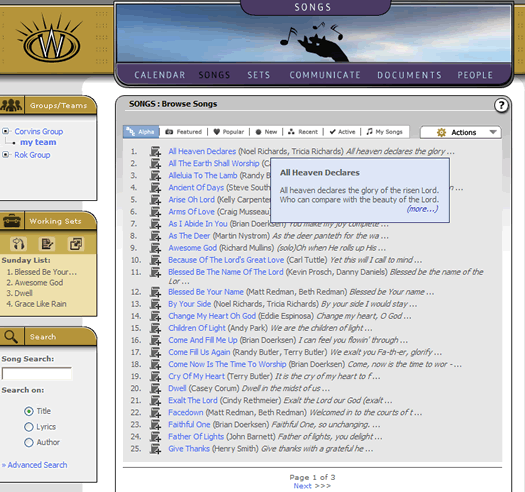
The main landing area for the songs section contains a listing of songs, with various tabs to sort and organize the songs in a way that is helpful to users. There is also a search box on the lower left corner of the screen (there is actually a search function for every section of the website, in case you were wondering). Searching through songs is an especially powerful mechanism, since songs contains such a wealth of information. Explore the search, and try out the advanced search as well. These can very helpful tools in finding the exact song you want.
For now, mouse-over the "Actions" menu on the main songs page. Team and group administrators will see the following options appear.
The Create or Import options for the songs section will take you to 2 powerful wizards that guild you through putting your own songs in your workspace. While we won't go into the details of it here, they are functions every worship leader will want to investigate.
At this point, move the mouse to the end of the text each of the song listings. You will note that the songs all contain a portion of the first line of lyrics in each of the listings, allowing you to see which songs you are looking at before drilling down on a specific song. In some cases, however, even a first line is not quite enough for you to determine if you have the correct song. An additional help we have added here is a mini-window that will appear when you mouse-over the appended "..." that is on the end of each song listing lyric field. When you do this, a small blue translucent box will appear showing the first segment of the lyrics of the song you are mousing over. This can be very helpful in clarifying exactly which song you are looking at. This appears to the user as follows:
When you have found a song you would like to view, simply click on the song title or the "more" link in the translucent blue help box (if you activated that). Either way, will take you to the view of the full song.