Contents - Index - Previous - Next
Songs - Viewing
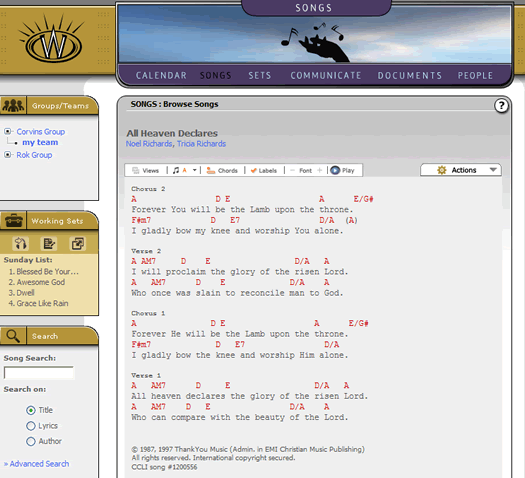
When you jump to view a single song, the screen will appear something like this:
There are many controls and options that you have at your disposal for both viewing or editing a song and you can examine these liberally.
One important menu control is the key drop down. This is identified by a musical note next to the key of the song. Mousing over the musical note graphic will cause the menu to drop down, exposing all the keys you can transpose the chord chart into. In the case of the screen shot below, we transposed the song from the key of A to the key of Bb.
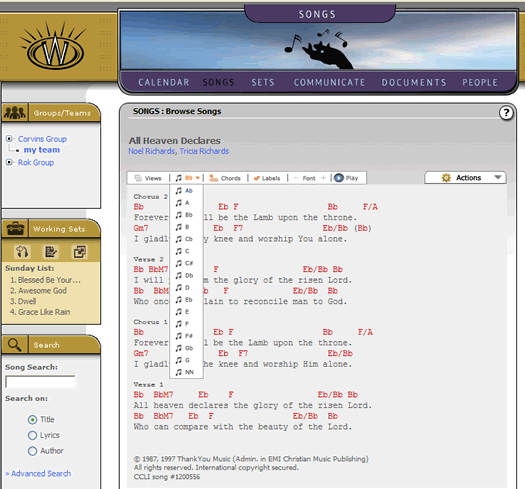
You have a complete selection of keys to use, as well as the added ability to transpose to basic Nashville Number notation (notated by NN on the drop down menu).
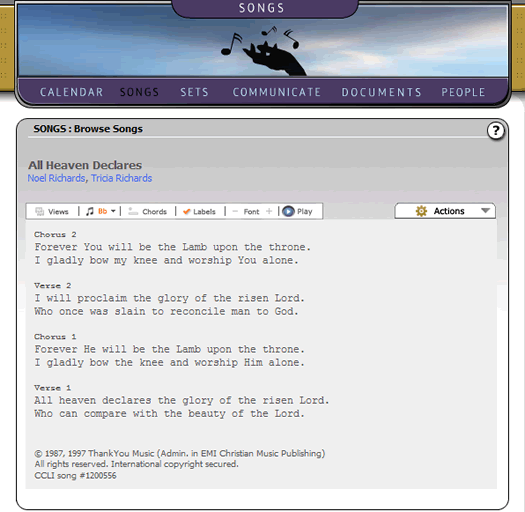
Another obvious control is the audio play icon, which allows you to listen to the song. An important toggle included on the song view is the "Chords" button. Selecting this will toggle the chords of the song in/out of user view, as follows:
You can try out the other options and action menu features at your leisure. For some additional training on songs, you should visit the Managing Songs tutorial once you have completed this basic tutorial.