Contents - Index - Previous - Next
Calendar - Views
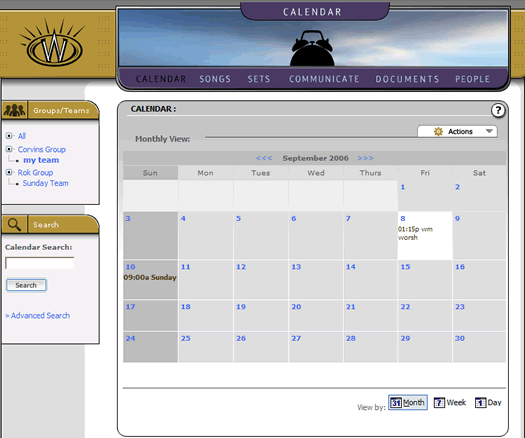
Like most calendar systems, it is helpful to see events and schedules through different views. Our calendar system has actually four views, of which we will briefly see three. The first view is the most common, called a month view. It appears as the default when you land in the calendar section as follows:
The month view appears as a regular wall calendar, allowing the user to see quickly the entire month of events at once.
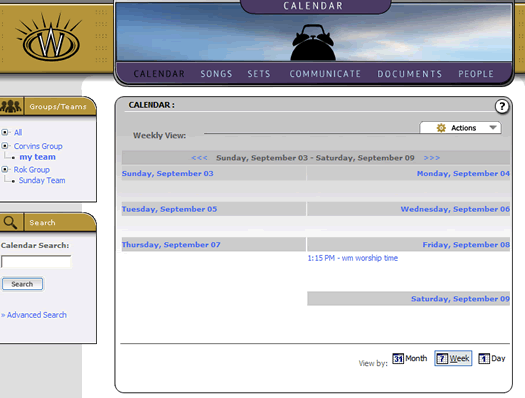
When using a calendar a lot, however, we all can get busy and we need more details when we see a calendar, so our system has a weekly view as well. You can switch to the "week" view by selecting the "week" calendar icon at the bottom right hand corner of the calendar screen. Once you have selected that, the calendar will appear as follows:
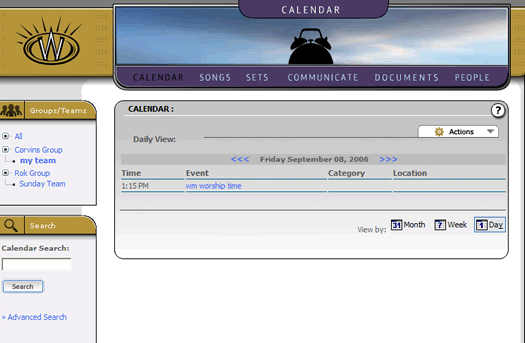
The last view we will examine here is the "Day" view, which is as it states- the contents of all events and schedules that are inclusive of a single day. Again, click on the appropriate view icon at the bottom right hand corner of the calendar screen to go to the "Day" view. It should appear as follows:
A final view that the calendar provides for us is something called a schedule. This is a much more powerful feature than a date locked calendar, because it involves the ongoing rotation of a repeating event(s) and gives us a grid to plan for weeks or months of recurring events. As it turns out, this is exactly what worship teams do when they play every week-- and the "Scheduler" at Worshipteam.com is perfect for that task. While we won't go into its features in this brief tutorial, it is something that will help the administrators of teams and groups to automatically schedule any number of people or teams (or combinations thereof) for any type of recurring event (like a Sunday or set of weekend services). Because of the power and usefulness of this tool, it is going to be the topic of its own tutorial, to help you discover how it can help your entire ministry or team schedule their recurring events.
For the purpose of this tutorial, however, lets go on to learn how to create a more basic event.